![white logo.png]](https://learn.onwarddelivery.com/hs-fs/hubfs/white%20logo.png?height=24&name=white%20logo.png)
Onward has three avenues for pricing orders:
Bidding:
Instead of calling all your carrier contacts for every order to get a quote, submit order details, collect quotes, and award orders in a single place. Want to add your carriers to see your orders and provide their quotes? See this article on adding partner carriers.
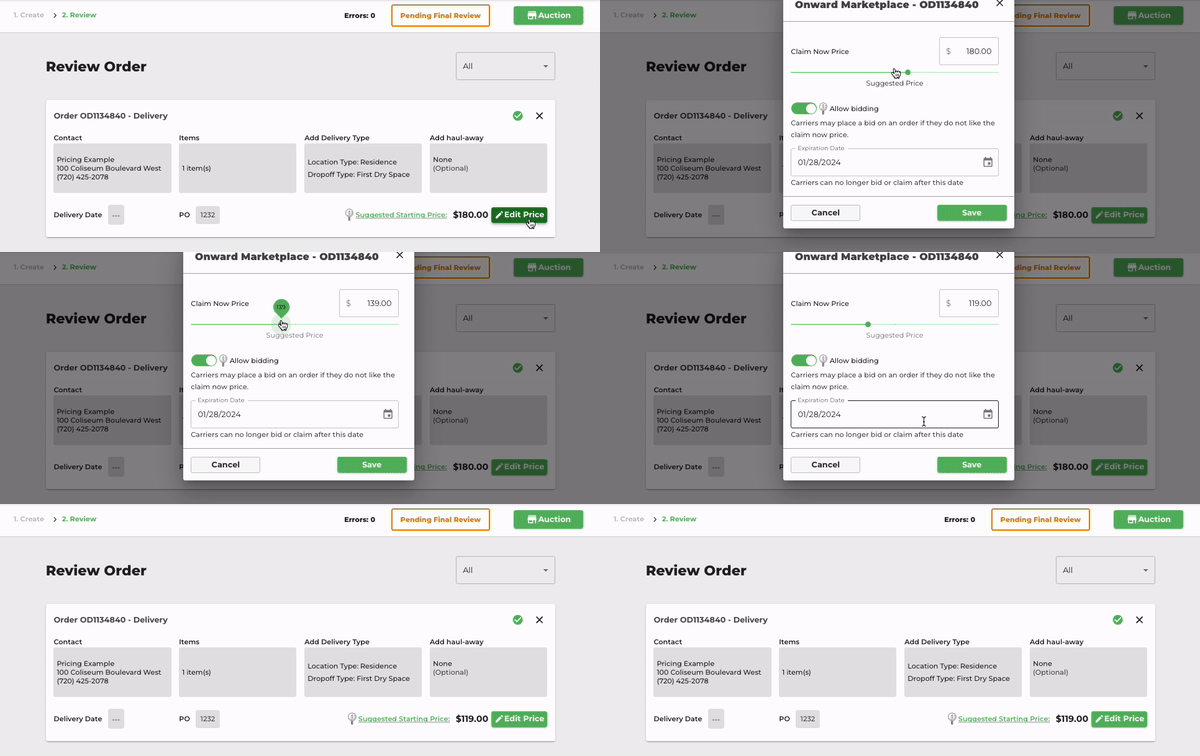
Suggested Starting Price: When orders are sent to the marketplace, the Onward algorithm assesses mileage, dimensions, weight, and service level to suggest a price. This is our recommendation for getting the order matched, claimed, and serviced as quickly as possible.
Adjusting the Starting Price: Have a target price you're aiming for, or hoping to carve out a little profit on deliveries? Adjust the starting price by clicking Edit Price and save.
Confirm and Submit: Finalize the details and get the order in front of the carrier network to provide quotes.
Claim Now Price:
If you're not looking for quotes, but just want to see about finding a carrier to accept the price you're looking for, you can do that too.
Adjusting the Price: Set your desired price by clicking Edit Price and save.
Turn Off Bidding: In the Edit Price module or by clicking the Auction button in the top right corner, turn off the toggle that says Allow Bidding.
Contract Rates:
Depending on the volume of deliveries you're managing, there may be an opportunity to set established rates in place with Onward. If you're interested in exploring this path, shoot us a message at sales@onwarddelivery.com to begin the discussion.